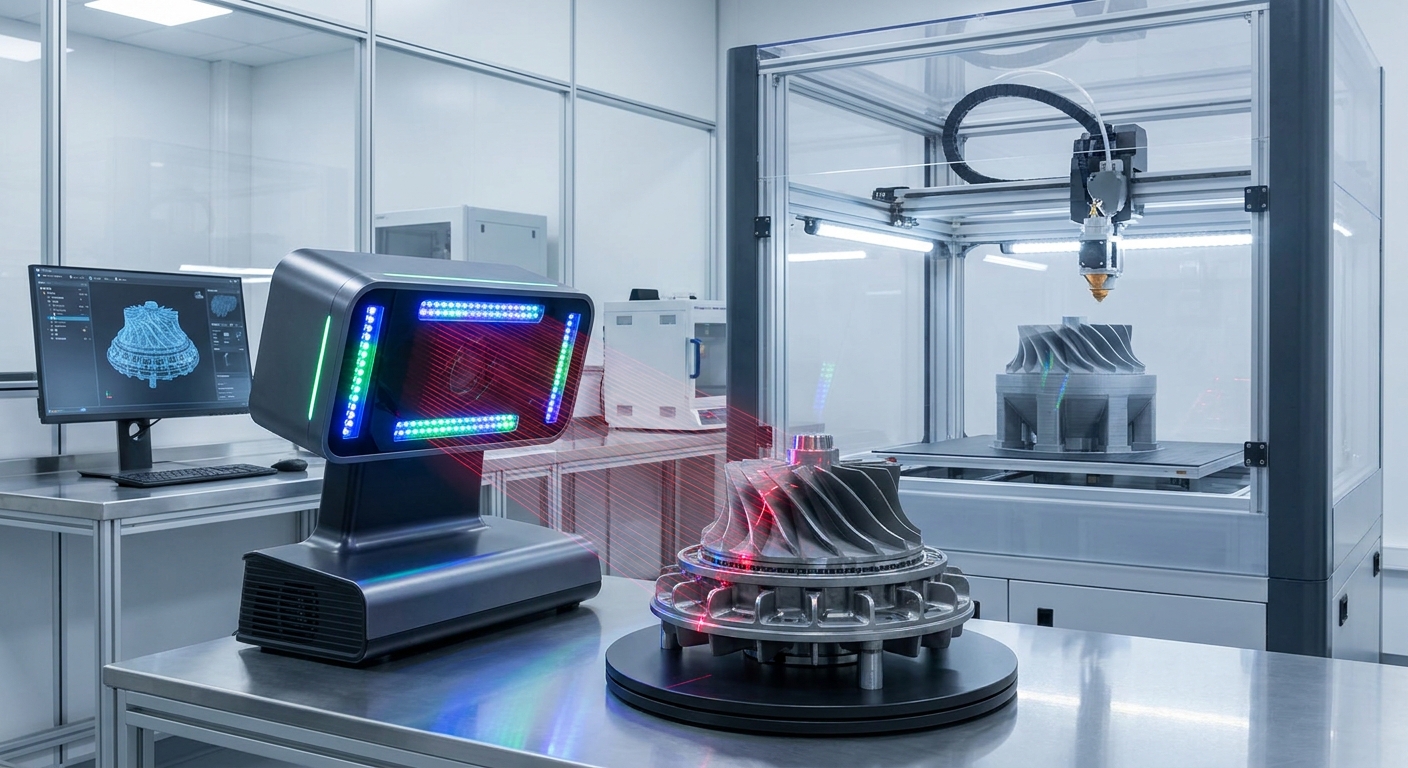
Revolutionizing 3D Printing: Mastering MagiScan Models in 2026
Creating accurate, print-ready 3D models from real-world objects is now achievable with advanced 3D scanning technology, transforming industries from manufacturing to healthcare. The MagiScan 3D scanner offers unparalleled precision and ease of use, enabling users to capture intricate details and generate high-fidelity digital twins for 3D printing applications. By leveraging MagiScan, professionals can significantly reduce design iterations, improve product quality, and unlock new possibilities in prototyping and custom creation.
The global 3D printing market is projected to reach $62.5 billion by 2027, demonstrating a compound annual growth rate of 21.3%, underscoring the increasing demand for precise 3D data acquisition. This article delves into the core aspects of utilizing MagiScan for 3D printing, exploring its capabilities, best practices, and the diverse applications it empowers across various sectors. We will cover everything from initial scanning techniques to post-processing and final print optimization.
Key Takeaways
- MagiScan technology enables the direct conversion of physical objects into highly accurate, 3D printable digital models with sub-millimeter precision.
- Optimizing scan settings within MagiScan, such as resolution and texture capture, is crucial for achieving superior print quality and detail fidelity.
- Post-processing workflows, including mesh repair and simplification using MagiScan's integrated tools or compatible software, are essential for preparing models for additive manufacturing.
- MagiScan facilitates rapid prototyping, custom medical device creation, and detailed inspection of manufactured parts, directly impacting product development cycles.
- The cost savings associated with reduced prototyping iterations and material waste, estimated at up to 30% for complex designs, make MagiScan a strategic investment.
How Does MagiScan Ensure High-Fidelity 3D Models for Printing?
MagiScan achieves high-fidelity 3D models for printing through a combination of advanced sensor technology, intelligent data processing algorithms, and user-centric software. Its high-resolution sensors capture millions of data points per scan, precisely mapping the surface geometry and textural details of an object. The integrated software then fuses these data points into a watertight, manifold mesh, ensuring a clean and printable digital representation.
This process is critical for additive manufacturing, where even minor inaccuracies can lead to failed prints or compromised final products. MagiScan’s proprietary algorithms are designed to minimize noise and distortion, preserving the original object’s form and intricate features. This level of detail ensures that when a MagiScan model is sent to a 3D printer, the resulting physical object accurately reflects the scanned item, from subtle curves to sharp edges.
Understanding MagiScan's Scanning Technologies
MagiScan employs state-of-the-art scanning technologies tailored for precision and efficiency. Depending on the specific MagiScan model, users benefit from either structured light scanning or photogrammetry-enhanced scanning. Structured light projectors cast precise patterns onto the object, and the scanner’s cameras analyze the deformation of these patterns to calculate depth and shape. This method excels in capturing fine details and geometric accuracy.
Photogrammetry integration, where available, utilizes multiple overlapping photographs taken from various angles. MagiScan's software then processes these images to reconstruct a dense 3D point cloud and mesh. This approach is particularly effective for capturing color textures and larger objects, providing a more comprehensive digital replica. The synergy between these technologies allows MagiScan to adapt to a wide range of object sizes and complexities, ensuring optimal data capture for 3D printing.
Optimizing Scan Settings for Printability
Achieving optimal printability from a MagiScan model hinges on carefully selecting and adjusting scan settings. Resolution is paramount; higher resolutions capture more detail but also generate larger data files, requiring more processing power and potentially longer print times. For most 3D printing applications, a resolution between 0.1mm and 0.5mm provides an excellent balance between detail and manageability.
Texture capture settings also play a role, especially for applications where visual appearance is as important as form, such as product visualization or artistic creations. MagiScan allows users to control texture quality, ensuring that vibrant and accurate surface colors are incorporated into the digital model. Furthermore, selecting the appropriate scan mode—whether for metallic, dark, or transparent objects—ensures that MagiScan’s sensors can effectively acquire data without interference, leading to cleaner, more complete scans ready for immediate use.
What Post-Processing Steps Are Necessary for MagiScan Models?
While MagiScan excels at capturing raw 3D data, several post-processing steps are typically required to prepare these models for seamless 3D printing. These steps ensure the digital model is "watertight" (a closed manifold mesh), free from errors, and optimized for the chosen additive manufacturing process. This refinement stage is crucial for preventing print failures and achieving desired dimensional accuracy and surface finish.
Post-processing begins with reviewing the raw scan data for any missing areas or noise. MagiScan’s software includes basic tools for filling holes and smoothing surfaces. For more complex repairs or model modifications, users often export the scan data to specialized 3D modeling software. This allows for detailed mesh editing, simplification of complex geometry if necessary, and the addition of features like support structures or interlocking components.
Mesh Repair and Watertightness
Ensuring a 3D model is "watertight" is non-negotiable for 3D printing. A watertight model, also known as a manifold mesh, has no holes, gaps, or non-manifold edges. These imperfections can confuse slicing software, leading to errors in layer generation and ultimately, failed prints. MagiScan's internal algorithms work to create a watertight mesh automatically, but occasional manual intervention may be needed, especially for scans of complex or thin-walled objects.
Tools within MagiScan, or third-party software like Meshmixer or Netfabb, can automatically detect and repair common mesh errors. This includes filling small holes, merging overlapping faces, and correcting inverted normals. The goal is to create a continuous, enclosed surface that defines a solid volume, which is fundamental for any slicing software to interpret and prepare for printing.
Mesh Simplification and Decimation
High-resolution scans from MagiScan can produce incredibly detailed meshes, often containing millions of polygons. While this detail is excellent for visualization and analysis, it can sometimes be excessive for 3D printing, leading to excessively large file sizes and extended slicing times. Mesh decimation, or simplification, reduces the polygon count of a 3D model while attempting to preserve its overall shape and key features.
This process is particularly useful when preparing models for FDM (Fused Deposition Modeling) or SLA (Stereolithography) printing, where extreme geometric detail might not be discernible or beneficial. MagiScan's software offers options to simplify meshes to a target polygon count or a specific level of detail. This optimization not only speeds up the printing workflow but can also reduce the computational load on the slicing software and potentially improve print times.
Model Scaling and Orientation
Before sending a MagiScan model to the printer, it’s essential to verify its scale and orientation. The scanning process captures the object in its real-world dimensions, but sometimes adjustments are needed for specific applications. For example, a model might need to be scaled up for display purposes or scaled down to fit a particular assembly. MagiScan's software allows for precise scaling of the entire model.
Proper orientation on the print bed is equally critical. The way a model is positioned can significantly impact print quality, strength, and the need for support structures. For instance, orienting a model to minimize overhangs or to align layer lines with stress points can improve its mechanical properties. Users can manipulate and orient their MagiScan models within the software to achieve the most efficient and effective print setup.
What Industries Benefit Most from MagiScan 3D Printing Models?
The versatility and accuracy of MagiScan technology make it a valuable asset across a wide spectrum of industries, transforming how products are designed, manufactured, and utilized. From rapid prototyping in engineering to patient-specific implants in medicine, MagiScan empowers professionals to translate physical reality into digital assets ready for additive manufacturing. The ability to quickly and accurately capture complex geometries opens doors to innovation and customization previously unattainable.
Logistics managers can use MagiScan to create digital twins of inventory for precise tracking and management. E-commerce sellers can generate photorealistic 3D models of products for immersive online shopping experiences. Industrial engineers benefit from detailed scans for quality control and reverse engineering. Medical professionals leverage MagiScan for creating custom prosthetics, surgical guides, and anatomical models.
How Do Logistics Managers Leverage MagiScan for 3D Printing?
Logistics managers can utilize MagiScan to create precise 3D models of items within their supply chain. This enables the creation of custom-fit storage solutions, optimized packing materials, or even replacement parts for specialized equipment through 3D printing. For example, a manager could scan a unique, irregularly shaped component of a sorting machine and then 3D print a replacement part, minimizing downtime.
Furthermore, MagiScan models can be used to generate digital inventories. By scanning and creating 3D printable models of goods, logistics companies can develop highly accurate virtual representations for warehouse planning, layout optimization, and even for creating mock-ups for client presentations. This digital fidelity reduces the need for physical prototypes and streamlines inventory management processes, potentially saving up to 15% on warehousing costs through better space utilization.
What Advantages Does MagiScan Offer E-commerce Sellers?
E-commerce sellers gain a significant competitive edge by using MagiScan to create interactive 3D models of their products. These models allow customers to view products from every angle online, zoom in on details, and even place virtual items in their own environment using augmented reality. This immersive experience significantly boosts customer engagement and reduces return rates, with studies showing an average increase in conversion rates of 20-30% for products with 3D models.
Beyond customer-facing applications, MagiScan can also be used by e-commerce sellers to 3D print custom packaging inserts that perfectly cradle delicate products, ensuring safe transit. This reduces material waste associated with generic packaging and enhances the unboxing experience. The ability to quickly prototype new product packaging designs using MagiScan also accelerates market entry for new items.
How Are Medical Professionals Using MagiScan for 3D Printing?
The medical field is a prime beneficiary of MagiScan's capabilities for 3D printing. Surgeons use patient-specific anatomical models, generated from scans of CT or MRI data, to plan complex procedures with unprecedented accuracy. These models allow for pre-operative practice, reducing surgical time by an average of 15% and improving patient outcomes.
MagiScan is also instrumental in creating custom prosthetics and orthotics. By scanning a patient’s limb or affected area, highly personalized devices can be designed and 3D printed, offering superior comfort and functionality compared to mass-produced alternatives. This patient-centric approach improves quality of life and can reduce the cost of custom medical devices by up to 40%.
What Role Does MagiScan Play in Industrial Engineering?
Industrial engineers rely heavily on MagiScan for quality control, reverse engineering, and rapid prototyping. They can scan manufactured parts to compare them against original CAD designs, identifying deviations with sub-millimeter accuracy. This ensures that components meet stringent quality standards and can help diagnose manufacturing defects early in the production cycle, preventing costly recalls.
Reverse engineering with MagiScan involves scanning an existing part for which no CAD data is available. This allows engineers to recreate digital models, which can then be modified, improved, or used to manufacture replacement parts. For new product development, MagiScan accelerates the prototyping process, enabling engineers to quickly iterate on designs, test form and fit, and bring products to market up to 25% faster.
What Are the Key Considerations When Choosing a MagiScan for 3D Printing Needs?
Selecting the right MagiScan model for your specific 3D printing requirements involves evaluating several key technical specifications and application needs. The intended size and complexity of the objects to be scanned, the required level of detail and accuracy, and the budget are all critical factors. Understanding these considerations ensures that the chosen MagiScan solution will effectively meet your 3D printing workflow demands.
Different MagiScan series are optimized for different use cases. For instance, handheld scanners offer flexibility for scanning large or difficult-to-access objects, while desktop scanners provide exceptional precision for smaller, intricate items. The software ecosystem, including its integration capabilities with CAD and slicing software, also plays a vital role in determining the overall efficiency of your 3D printing pipeline.
Accuracy and Resolution Requirements
The accuracy and resolution capabilities of a MagiScan are paramount for successful 3D printing. Accuracy refers to how closely the scanned data matches the real-world dimensions of the object, typically measured in micrometers (µm) or millimeters (mm). Resolution dictates the smallest feature that can be captured, often expressed as the point spacing or the minimum detectable detail.
For applications requiring high precision, such as medical implants or intricate engineering components, a MagiScan with accuracy ratings of 20µm or better might be necessary. For less demanding applications, like general product prototyping or creating visual aids, a resolution of 0.1mm to 0.5mm is often sufficient. It's crucial to match the scanner’s capabilities to the tolerances required by your 3D printing process and the intended function of the printed object.
Object Size and Type Compatibility
MagiScan scanners are designed to handle a wide range of object sizes, from small electronic components to large industrial machinery. Handheld models, like the MagiScan Xtend series, are ideal for scanning larger items or those in situ, offering a scanning volume of up to 10 cubic meters. Desktop scanners, such as the MagiScan Precision Pro, excel at capturing smaller objects with exceptional detail, often within a scanning volume of 200 x 150 x 100 mm.
The type of object also influences the choice. Scanning shiny, dark, or transparent objects can be challenging for some 3D scanning technologies. MagiScan often incorporates specialized software features or hardware accessories, like scanning spray or matte coatings, to improve data acquisition on such surfaces. Understanding the material properties of the objects you intend to scan will help in selecting a MagiScan model that can reliably capture them.
Software Integration and Workflow Efficiency
The software accompanying a MagiScan is as important as the hardware itself. A robust software suite should offer intuitive tools for scan capture, data processing, mesh editing, and export. For 3D printing, seamless integration with popular CAD software (like SolidWorks, Fusion 360) and slicing software (like Cura, Simplify3D) is essential for an efficient workflow.
MagiScan’s integrated software often includes features for automatic mesh generation, hole filling, and smoothing, reducing the need for extensive manual post-processing. The ability to export models in standard file formats such as STL, OBJ, or PLY ensures compatibility with virtually any 3D printer and slicing software. A streamlined workflow, from scanning to printing, directly impacts productivity and cost-effectiveness.
Frequently Asked Questions
What is the typical accuracy of a MagiScan model for 3D printing?
MagiScan models can achieve accuracies ranging from 0.02mm to 0.5mm, depending on the specific scanner model and object characteristics. This level of precision is sufficient for most industrial, medical, and consumer 3D printing applications.
Can I 3D print directly from a MagiScan scan without any processing?
While MagiScan aims to produce clean data, some post-processing is generally recommended to ensure a watertight, error-free mesh suitable for all slicing software and 3D printers. This typically involves mesh repair and optimization.
How long does it take to scan an object with MagiScan?
Scanning time varies significantly based on object size, complexity, and the desired resolution. A small object might take a few minutes, while a larger, more complex item could take 15-30 minutes of scanning time, followed by processing.
Does MagiScan capture color information for 3D printing?
Yes, many MagiScan models are equipped with high-resolution cameras that capture detailed color textures. This color data can be applied to the 3D printed model if the printer supports multi-color printing or used for digital visualization.
What is the cost of a MagiScan system for 3D printing applications?
MagiScan systems vary in price, typically ranging from $5,000 for entry-level professional models to over $50,000 for high-end industrial systems. The cost is justified by the significant improvements in prototyping speed, design accuracy, and reduction in material waste.
Conclusion
MagiScan technology represents a significant leap forward in bridging the gap between physical objects and digital fabrication, making the creation of high-quality 3D printable models more accessible and accurate than ever before. Whether you are an industrial engineer optimizing a manufacturing process, a medical professional crafting patient-specific devices, or an e-commerce seller aiming to revolutionize online product presentation, MagiScan offers a robust solution. By understanding its capabilities and best practices for post-processing and printing, users can unlock unparalleled opportunities for innovation, efficiency, and cost savings.
Ready to experience the precision and power of MagiScan for your 3D printing projects? Try MagiScan today and transform your ideas into reality with unmatched accuracy.